


Details of the process to tag CT components for deployment
Audience: ODVA Staff – Software Development
The Assembly File Version is used to keep track of dll versions. The version number contains four entries: major, minor, build, and revision. The major version shall match the CT version number. The minor version shall begin with zero for each CT major release, then increment with each patch release. The build and/or revision number may be incremented to identify internal builds in which the major and minor version numbers are not modified.
To easily update the version numbers for all assemblies, use the “Versioning Controlled Build” plugin for Microsoft Visual Studio. The plugin may be downloaded through the Microsoft extensions portal.
To update version numbers, open the VCB GUI and go to the File Versions tab. Select All of the projects needing version update (usually this should be all projects in the solution). Enter the “To version” value and select Save. Note that this will update the AssemblyInfo file in every project selected.

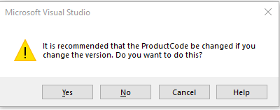
The Deployment installer requires a version number, too. If this number is not incremented, the user will be forced to uninstall previously installed software with the same installer version number. The version number is part of the deployment project properties. When you change the version number, you will be prompted to update the Product Code as well. The Product Code must be updated.

In this article: CT build, Version, Deployment
This is a test comment. Users are permitted to edit their own comments.